

[OPEN-SOURCE] AI-Powered Penetration Testing Framework
An intelligent multi-agent system for automated security assessment and penetration testing.
A hosted version is available for quick testing without local setup. Blacksmith-AI
- Overview
- Architecture
- Prerequisites
- Installation
- Quick Start with Makefile
- Configuration
- Usage
- Tools & Capabilities
- Agent Workflow
- Troubleshooting
- Documentation
BlacksmithAI is an opensource advanced penetration testing framework that leverages multiple AI agents to automate security assessments. The system orchestrates specialized agents through a complete penetration testing lifecycle—from reconnaissance to post-exploitation—using professional security tools in a controlled environment.
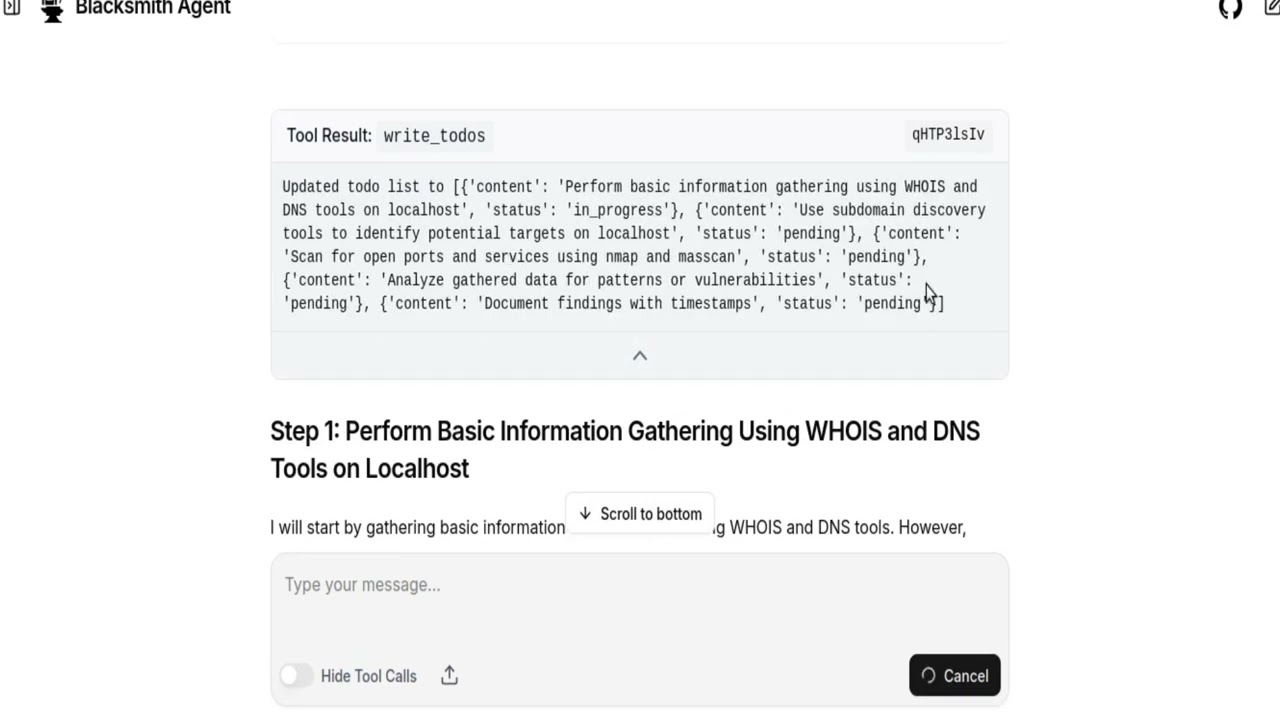
- Multi-Agent Architecture: Specialized agents for each phase of penetration testing
- Professional Tooling: Pre-configured Docker image with industry-standard security tools
- Flexible LLM Providers: Support for OpenRouter, VLLM, and custom providers
- Web & Terminal Interfaces: Choose between a modern UI or CLI interaction
- Automated Reporting: Generates comprehensive security reports with evidence
- Safe & Controlled: Non-interactive CLI tools designed for AI agent execution
- Automated security assessments
- Continuous security monitoring
- Educational penetration testing
- Vulnerability discovery and validation
- Security research and development
BlacksmithAI uses a hierarchical multi-agent system.
-
Orchestrator
- Command and control center
- Manages mission planning and task delegation
- Coordinates subagents and generates final reports
-
Specialized Subagents
- Recon Agent: Attack surface mapping and information gathering
- Scan/Enum Agent: Deep scanning and service enumeration
- Vulnerability Analysis Agent: Vulnerability mapping and risk assessment
- Exploit Agent: Proof-of-concept exploitation
- Post-Exploit Agent: Impact assessment and pivot analysis
Each agent has access to specific tools tailored to its role, ensuring efficient and focused operations.
- Operating System: Linux (recommended), macOS, or Windows with WSL2
- RAM: Minimum 4GB (8GB recommended)
- Disk Space: 2GB+ including Docker images
- Docker: 20.10+ with Docker Compose
- Python: 3.12+ (managed via uv)
We rely on the following tools:
# Python package & environment manager
uv

# Containerization
Docker & Docker Compose

# Frontend runtime & tooling
Node.js 18+ (LTS recommended)
pnpm (fast JavaScript package manager)uv is a fast, modern Python package manager + environment tool — kind of like a turbocharged combo of pip, pipx, and virtualenv. ([GitHub][1])
# Install via official install script
curl -LsSf https://astral.sh/uv/install.sh | sh
If you prefer a Python-packaged version:
pip install uv
# or
pipx install uv
Verify:
uv --versionNotes:
- Standalone script is recommended for full functionality and auto-updates. ([Astral Docs][2])
- On Windows use PowerShell:
powershell -ExecutionPolicy ByPass -c "irm https://astral.sh/uv/install.ps1 | iex"Docker lets us containerize and run backend services, databases, etc.
sudo apt update
sudo apt install -y docker.io docker-composebrew install --cask dockerAfter installing, start Docker Desktop and confirm:
docker --version
docker compose version
If you see version outputs, you’re good to go.
Tip: On Linux you may want to add your user to the docker group:
sudo usermod -aG docker $USER
# Then restart your terminalWe use Node.js for frontend tooling. Node 18+ is required for modern pnpm and ecosystem compatibility. ([docs.pyloid.com][3])
# Using NodeSource setup (recommended for precise versions)
curl -fsSL https://deb.nodesource.com/setup_18.x | sudo -E bash -
sudo apt install -y nodejsInstall with Homebrew:
brew install node@18Verify:
node --version
npm --versionpnpm is preferred for consistent, fast installs and predictable lockfiles. ([pnpm.cn][4])
You can install via one of these:
npm install -g pnpmcurl -fsSL https://get.pnpm.io/install.sh | sh -corepack enable
corepack prepare pnpm@latest --activateVerify:
pnpm --versionTry these checks:
uv --version
node --version
pnpm --version
docker --version
docker compose versionif you want to use vLLM local models
cd blacksmithAI/blacksmithAI
uv add vllm
uv add huggingface_hub

uv run hf auth login #if not logged in
vllm serve mistralai/Devstral-2-123B-Instruct-2512 \
  --host 0.0.0.0 \
  --port 8000 \
  --max-model-len 8192 \
--gpu-memory-utilization 0.75git clone https://github.com/yohannesgk/blacksmith.git# Install dependencies using uv
cd blacksmithAI/blacksmithAI
uv syncThe mini-kali container provides all penetration testing tools in a secure, isolated environment.
# start it with
cd blacksmithAI/blacksmithAI
docker compose up -dSkip this if using the terminal-only interface.
cd blacksmithAI/frontend
pnpm install
cd ../..For a simpler setup experience, use the provided Makefile commands. Run make help to see all available commands.
make setupThis command performs:
- Python dependency installation (
make install) - Docker image building (
make docker-build) - Frontend dependency installation (
make frontend-install)
After setup or installation, configure your environment:
# 1. Copy example environment file
cp blacksmithAI/.env.example blacksmithAI/.env

# 2. Edit .env with your API keys
nano blacksmithAI/.env

# 3. Edit config.json for your LLM provider
nano blacksmithAI/config.jsonmake start-cli
or
uv run main.pyThis command:
- Starts the mini-kali Docker container
- Launches the CLI interface
The Web UI requires multiple terminals. Run these commands in separate terminals:
# Terminal 1: Start Docker container
make docker-up

# Terminal 2: Start frontend
cd frontend && pnpm build && pnpm start

# Terminal 3: Start LangGraph dev server
cd blacksmithAI && uv run langgraph dev

or

cd blacksmithAI && uv run langgraph up
Then access: http://localhost:3000
# Install VLLM
make vllm-install

# Start VLLM server
make vllm-serve
# Or for smaller systems:
make vllm-serve-small| Command | Description |
|---|---|
make help |
Show all available commands |
make install |
Install Python dependencies |
make setup |
Complete initial setup |
make frontend-install |
Install frontend dependencies |
make docker-build |
Build mini-kali Docker image |
make docker-up |
Start Docker container |
make docker-down |
Stop Docker container |
make docker-logs |
View Docker logs |
make vllm-install |
Install VLLM for local LLM |
make vllm-serve |
Start VLLM server (123B model) |
make vllm-serve-small |
Start VLLM server (7B model) |
make start-cli |
Start CLI mode |
make start-ui |
Show Web UI setup instructions |
make start-all |
Quick start CLI mode |
make stop |
Stop all services |
make clean |
Clean up Docker containers |
make status |
Show Docker container status |
make check-deps |
Check if dependencies are installed |
make check-config |
Check configuration files |
make quickstart |
Display quick start guide |
# First time setup
make setup
cp blacksmithAI/.env.example blacksmithAI/.env
# Edit .env with your API keys

# Start CLI
make start-cli

# Start Web UI (3 terminals)
make docker-up
cd frontend && pnpm build && pnpm start
cd blacksmithAI && uv run langgraph dev

# Stop everything
make stopCreate a .env file from the example:
cp blacksmithAI/.env.example blacksmithAI/.envEdit .env and add your API key:
OPENROUTER_API_KEY=your-openrouter-api-key-hereNo environment variables needed. Ensure your VLLM server is running:
# Example VLLM server startup
vllm serve <model-name> --port 8000Edit blacksmithAI/config.json to configure LLM providers and models.
{
  "defaults": {
    "provider": "openrouter",  // or "vllm", or custom(openai)
  },
  "providers": {
    "openrouter": {
      "base_url": "https://openrouter.ai/api/v1/chat/completions",
      "default_model": "mistralai/devstral-2512:free",
      "default_embedding_model": "openai/text-embedding-3-small",
      "default_model_config": {
        "context_size": 200000,
        "max_retries": 3,
        "stream_usage": true,
        "max_tokens": null
      },
      "default_embedding_model_config": {
        "max_retries": 3,
        "embedding_ctx_length": 8191
      }
    },
    "vllm": {
      "base_url": "http://localhost:8000/v1/chat/completions",
      "default_model": "mistralai/devstral-2512",
      "default_embedding_model": "text-embedding-3-small",
      "default_model_config": {
        "context_size": 200000,
        "max_retries": 3,
        "stream_usage": true,
        "max_tokens": null
      },
      "default_embedding_model_config": {
        "max_retries": 3,
        "embedding_ctx_length": 8191
      }
    }
  }
}
you can support for more providers like openai, claude,...and many more. by simply editing config.json and adding api key to .env
for example if you want to add support for openai you can add this to providers in config.json:

   "openai": {
      "base_url": "....",
      "default_model": "gpt-5-mini",
      "default_embedding_model": "text-embedding-3-small",
      "default_model_config": {
        "context_size": 200000,
        "max_retries": 3,
        "stream_usage": true,
        "max_tokens": null
      },
      "default_embedding_model_config": {
        "max_retries": 3,
        "embedding_ctx_length": 8191
      }
    }

since the name of the provider here is set to `openai` you need to add OPENAI_API_KEY=**** to env file. so uppercase(provider_name)+API_KEY to env.
set the new provider to default by modifying:

	  "defaults": {
	    "provider": "openai"
	  },

Now everything is configured for openai.
you can easily scaleup with the above method and add more support.
defaults.provider: Default LLM provider to usebase_url: API endpoint for the providerdefault_model: LLM model identifierdefault_embedding_model: Model for embeddings (used in vector DB)context_size: Context window size of the selected model(required for summerization, to prevent context window overflow)max_retries: Number of retry attempts for failed requestsmax_tokens: Maximum tokens in responses (null = model default)
Interact directly through the terminal with full agent control.

# Start mini-kali Docker container
docker run -i --rm -p 9756:9756 mini-kali-slim -d

or

cd blacksmithAI/blacksmithAI
docker compose up -d
# Run BlacksmithAI
cd blacksmithAI/blacksmithAI && uv run main.py

or

cd blacksmithAI && make start-cli
Follow the prompts to initiate penetration testing tasks.

Access a modern, user-friendly interface for managing penetration tests.
# Terminal 1: Start mini-kali container
docker run -i --rm -p 9756:9756 mini-kali-slim -d

or

cd blacksmithAI/blacksmithAI
docker compose up -d


# Terminal 2: Start the frontend
cd blacksmithAI/frontend
pnpm build
pnpm start

# Terminal 3: Start LangGraph development server
cd blacksmithAI/blacksmithAI
uv run langgraph dev
Access the UI at: http://localhost:3000
A hosted version is available for quick testing without local setup.
BlacksmithAI provides access to professional penetration testing tools through the mini-kali Docker container. All tools are designed for non-interactive, stdin/stdout execution—ideal for AI agents.
Build the attack surface map through passive and active information gathering.
| Tool | Purpose |
|---|---|
assetfinder |
Discover subdomains and assets |
subfinder |
Subdomain enumeration |
whois |
Domain registration information |
dig |
DNS record lookup |
nslookup |
DNS query tool |
hping3 |
Network scanning and packet analysis |
dnsrecon |
DNS enumeration and reconnaissance |
Deep dive into discovered targets to identify services and vulnerabilities.
| Tool | Purpose |
|---|---|
nmap |
Network mapper and port scanner |
masscan |
High-speed port scanner |
enum4linux-ng |
SMB/Windows enumeration |
nikto |
Web server scanner |
whatweb |
Web technology identification |
fingerprintx |
Service fingerprinting |
gobuster |
Directory and DNS brute-forcing |
wpscan |
WordPress vulnerability scanner |
Map services to known vulnerabilities and assess security risks.
| Tool | Purpose |
|---|---|
nuclei |
Fast and customizable vulnerability scanner |
sslscan |
SSL/TLS configuration analyzer |
Execute controlled exploits and validate vulnerabilities.
| Tool | Purpose |
|---|---|
sqlmap |
Automated SQL injection |
hydra |
Password brute-forcing |
medusa |
Parallel network login auditor |
ncrack |
Network authentication cracking |
python/go/perl/ruby |
Custom exploit scripting |
Assess impact and identify pivot opportunities after successful exploitation.
| Tool | Purpose |
|---|---|
netcat |
Network debugging and data transfer |
socat |
Multi-purpose relay |
ssh -D |
SOCKS proxy tunneling |
impacket |
Windows protocol manipulation (psexec, secretsdump) |
Support tools for various tasks.
| Tool | Purpose |
|---|---|
curl |
Data transfer with URL syntax |
httpie |
User-friendly HTTP client |
trufflehog |
Secret and credential scanner |
- Web Browser: MCP-Playwright for automated web browsing
- Code Interpreter: MCP code interpreter for Python execution
- Exploits Database: Integration with Exploit-DB, or other providers for exploit scripts
- Interactive Tools: Support for Metasploit and other interactive frameworks
BlacksmithAI follows a structured penetration testing methodology through coordinated agent execution.
Role: General Commander
The orchestrator is the central coordination point that:
- Maintains the high-level mission plan
- Manages a todo list of tasks
- Delegates work to specialized subagents
- Generates structured final reports with findings, severity, evidence, and remediation guidance
Available Tools: planning tools, filesystem tools
Role: Attack Surface Mapping
Builds a comprehensive map of the target environment:
- Passive OSINT: DNS records, SSL certificates, WHOIS data
- Active Network Scanning: Port and service discovery
- Tech Stack Fingerprinting: Identify technologies and versions
Available Tools: Reconnaissance tools, general utilities
Role: Deep Inspection
After attack surface mapping, this agent:
- Performs user enumeration
- Probes APIs and endpoints
- Discovers versions and misconfigurations
- Identifies potential entry points
Available Tools: Scanning & enumeration tools, general utilities
Role: Risk Assessment
Analyzes outputs from scanning to:
- Map services to known vulnerabilities (CVEs, logic flaws)
- Prioritize by impact, exploitability, and business risk
- Generate concise evidence summaries
- Create attack hypotheses
Available Tools: Vulnerability mapping tools, general utilities
Role: Proof-of-Concept Execution
Validates vulnerabilities through controlled exploitation:
- Execute exploits in a controlled manner
- Validate impact without collateral damage
- Provide clean proof of compromise
- Return evidence (e.g., shell access, data extraction)
Available Tools: Exploitation tools, general utilities
Role: Impact Assessment
After successful exploitation:
- Assess the blast radius of the compromise
- Identify pivot paths for lateral movement
- Discover credentials and authentication mechanisms
- Document business impact
Available Tools: Post-exploitation tools, general utilities
Orchestrator
    ↓
Recon Agent → Attack Surface Map
    ↓
Scan/Enum Agent → Detailed Service Information
    ↓
Vuln Analysis Agent → Vulnerability Prioritization
    ↓
Exploit Agent → Proof of Concept
    ↓
Post-Exploit Agent → Impact Assessment
    ↓
Orchestrator → Final Report
Container won't start
# Check Docker is running
docker ps

# View container logs
docker logs mini-kali-slim
Port conflicts
# Check what's using port 9756
lsof -i :9756

# Use a different port
docker run -i --rm -p 9757:9756 mini-kali-slim -dOpenRouter connection errors
- Verify API key in
.envfile - Check OpenRouter status: https://status.openrouter.ai/
- Ensure internet connectivity
VLLM connection errors
- Verify VLLM server is running:
curl http://localhost:8000/v1/models - Check port configuration in
config.json - Ensure sufficient GPU/memory for VLLM
Build errors
# Clean and rebuild
cd blacksmithAI/frontend
rm -rf node_modules .next
pnpm install
pnpm build
UI not connecting
- Ensure LangGraph dev server is running
- Check browser console for errors
- Verify port 3000 is not in use
Slow responses
- Switch to faster LLM model
- Check system resources (RAM/CPU)
Agent stuck in loop
- Reduce task complexity
- Check tool documentation
- Review agent logs for errors
"Module not found"
# Reinstall dependencies
cd blacksmithAI/blacksmithAI
uv sync
"Permission denied"
# Fix file permissions
chmod +x blacksmithAI/blacksmithAI/main.pyFor more detailed information, refer to:
- Tools Documentation: Complete list of available tools and their capabilities
- Agent Tool Documentation: Tool-specific documentation for each agent
Contributions are welcome! Please read our contributing guidelines before submitting pull requests.
This project is open-source:
The source code is available under the GPL‑3.0‑only open‑source license for community use, modification, and redistribution (see LICENSE-GPL.txt).
For commercial use under different terms (for example, closed‑source distribution or integration without copyleft obligations), please contact us to obtain a commercial license.
You may choose which license to comply with when you use the code.
[Contact me]📧(mailto:yohannesgk@kahanlabs.com)
- Issues: Report bugs and feature requests on GitHub
- Discussions: Join our community discussions discord
- Documentation: Check our Wiki for additional resources